

From smarter schedules and simpler travel planning to personalized shopping, AI agents are shifting digital assistance from answering questions to taking action. Here is what that means for real people—and where the limits still matter.
EMERGING TECHNOLOGY • Updated 17 October 2026 • Approx. 9-minute read
Illustration: An AI agent could coordinate information across daily activities, with the user in control.
Imagine waking up to a clear summary of your day: a meeting moved, rain expected during your commute, a delivery delayed, and a draft reply ready for your approval. Instead of checking five apps, you review one organized plan. That is the appeal of AI agents: not simply giving an answer, but helping coordinate the steps that follow.
The important distinction is that this scene remains partly aspirational. Some tools already organize information, schedule recurring work, browse websites and carry out limited actions. Reliable, universal automation across every app and situation is still a work in progress. Understanding both sides makes it easier to use the technology well.
What exactly is an AI agent?
An AI agent is software that can pursue a goal by interpreting information, deciding what to do next and, when granted access, using digital tools to take action. A traditional chatbot mainly responds to a prompt. An agent may take several steps toward an outcome—for example, checking available dates, comparing options, drafting a message and asking you to approve it.
Not every AI-powered assistant is a fully autonomous agent. Some features are essentially smart search or preset automation. The defining shift is the ability to combine reasoning with tools, changing its steps as new information appears. The degree of independence varies greatly between products.
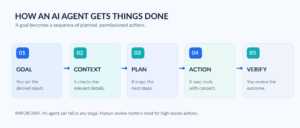
The simplified agent workflow: goal → context → plan → action → verification.
Where AI agents are already entering everyday life
The strongest use cases are ordinary, repetitive tasks—especially those that require information to move between emails, calendars, documents and websites. Here are the areas worth watching.
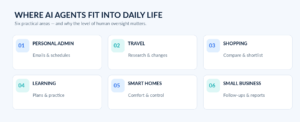
Six everyday areas where agents could reduce repetitive digital work.
1. Personal planning and the invisible admin of life
Email threads, calendar invitations, bills, school notices and reminders create a surprising amount of routine work. An agent connected to approved apps can help summarize new messages, surface deadlines, suggest a weekly schedule or prepare replies for review. Google describes Gemini tasks that can manage recurring workflows, and Microsoft documents Copilot Tasks for research, scheduling and routine processes [1][2].
The biggest practical benefit is less context-switching. Rather than repeatedly hunting for details, a user can review a prepared plan. But connecting apps also means sharing access. Users should choose carefully which sources an agent can read and which actions it may perform.
2. Travel planning that moves beyond recommendations
A conventional assistant might suggest a three-day itinerary. An agent could go further: check flight and hotel options against a budget, track a price change, organize booking details, and prepare the next step. Microsoft’s Copilot Actions has described supported web tasks such as booking and scheduling; features and partners vary by product and market [3].
Travel still shows why oversight matters. Prices and availability change; cancellation policies can be complex. A useful agent should show the source, final price, conditions and exact action before a booking is confirmed.

Illustration: A travel assistant brings schedules, routing, weather and shopping context into one view.
3. Shopping with more comparison—and more responsibility
Imagine asking an agent to find a replacement phone charger under a set budget, confirm that it is compatible with your device and alert you if the price drops. Google announced Universal Cart in 2026, describing price tracking and compatibility suggestions as part of its evolving shopping experience [4]. These kinds of tools point toward more proactive commerce.
Still, a smart recommendation is not always an impartial recommendation. Sponsored placements, preferred sellers, hidden fees and questionable product listings can affect what gets surfaced. The safest approach is to let an agent research and shortlist, then personally check the seller and approve payment.
4. Learning that adapts to a student’s needs
An educational agent could break a difficult chapter into smaller lessons, generate short quizzes, notice where a learner is struggling and suggest what to practice next. For university students, it could help organize assignment deadlines and build revision schedules from a course outline.
The goal should be better learning, not invisible outsourcing. Students still need to check explanations, verify references and do their own thinking. Teachers can use agents to prepare materials, but assessment, student privacy and academic-integrity rules need human judgment.
5. Smarter homes and more accessible technology
In connected homes, an agent may combine routines, schedules and sensor information to suggest energy-saving adjustments, manage compatible devices or alert residents when something looks unusual. For people with accessibility needs, voice commands and multi-step automation can also remove friction from everyday digital tasks.
These benefits depend on device compatibility, reliable connectivity and sensible boundaries. Physical safety actions, surveillance and home-security controls should never be casually delegated to an untested system.
6. Small businesses and solo creators
An entrepreneur might use an agent to gather customer questions, prepare a response queue, update a task tracker or summarize a week’s sales data. For content creators, agents can organize research, build an editorial calendar and turn rough notes into a draft—while leaving originality, fact-checking and final judgment to the creator.
Google’s October 2026 Workspace announcement describes agents working across Gmail, Docs, Sheets and Calendar, reflecting how cross-app workflows are becoming more central to work software [5]. For small teams, the real opportunity is to reclaim time for relationships, judgment and creative work.
What changes when AI moves from answers to actions?
The difference is easy to underestimate. A wrong answer is inconvenient; an incorrect action can send a private email, modify a file, miss a deadline or spend money. This is why the best agent experiences are not the ones with the most autonomy. They are the ones that can make their plan visible, request the right permission and recover safely when something goes wrong.
Three practical shifts stand out:
- Less app-hopping. A single request can coordinate information from multiple approved tools.
- More proactive help. Scheduled or event-triggered tasks can surface changes without a fresh prompt.
- Higher trust requirements. Accuracy, consent, transparency and the ability to stop an action become essential.
The risks behind the convenience
AI agents can misread instructions, rely on outdated pages or be tricked by malicious content embedded in websites and documents. Security specialists call one especially important risk “excessive agency”: giving a system more access, power or independence than it needs [6]. The US National Institute of Standards and Technology launched an AI Agent Standards Initiative in February 2026, citing the need for secure, interoperable agents [7].
Privacy matters just as much as performance. If an agent can read your inbox or documents, verify how the provider handles that information, what permissions are required and how access can be revoked. Avoid putting passwords, card numbers or medical details into a task unless you understand the service’s controls. AI can assist with health or financial organization, but it should not replace qualified advice or make sensitive decisions without appropriate human involvement [2].
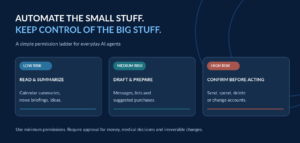
A simple permission ladder: automate reading, review drafts and explicitly approve high-stakes actions.
How to start using AI agents safely
You do not need to hand an AI system control of your digital life to discover its value. Start with one narrow, reversible task: summarize newsletters every Friday, prepare a grocery list from a meal plan or assemble possible times for a meeting.
- Define the outcome. Describe exactly what a good result looks like, including limits and exclusions.
- Start with read-only access. Connect only the information the task genuinely needs.
- Keep confirmation on. Require your approval before sending, buying, deleting or changing anything important.
- Check the evidence. Ask for links, timestamps, prices and clear descriptions of planned actions.
- Review the result. Measure whether the task actually saved time and disconnect unused permissions.
A good starter instruction might be: “Review my approved calendar and create a draft plan for next week. Flag conflicts and ask me before changing anything.” The boundary is part of the prompt—not an afterthought.
What comes next?
Over the next few years, agents may become better at understanding context, moving between applications and coordinating routine workflows. More consistent interoperability, strong permissions and reliable ways to verify completed actions could matter as much as more powerful AI models. Those improvements are possibilities, not guarantees: cost, access, error rates, regulation and user trust will shape adoption.
The most useful future is not one where people surrender every choice to software. It is one where tedious digital coordination becomes easier and people keep control over decisions that involve their money, privacy, relationships and wellbeing.
Frequently asked questions
Are AI agents the same as chatbots?
No. A chatbot commonly responds to prompts. An agent can work toward a goal through several steps, sometimes using connected apps or websites. Some products combine both capabilities.
Can AI agents work without constant supervision?
Some can run scheduled or limited tasks, but reliability varies. Money, sensitive data, important messages and irreversible actions should generally require explicit confirmation.
Can AI agents replace human assistants?
They can automate parts of research, scheduling and administration. They do not consistently replace human judgment, accountability, empathy or domain expertise.
Do I need coding skills to use an AI agent?
Not necessarily. Some consumer tools use ordinary language to set up tasks, although advanced custom workflows may require technical work.
Are AI agents safe to use?
They can be useful when you choose reputable services, limit permissions, verify results and keep humans in the loop for consequential actions.
Final thought
The next chapter of AI may be less about what a system can say and more about what it can responsibly do. Used thoughtfully, AI agents can make everyday life feel lighter—one small, verified task at a time.
Sources and further reading
[1] Google, “Manage your tasks & workflows in Gemini Apps” (2026).
[2] Microsoft Support, “Using Copilot Tasks” (2026).
[3] Microsoft, “Take Back Your Time with Copilot Actions” (29 May 2025).
[4] Google, “100 things we announced at Google I/O 2026” (2026).
[5] Google Cloud, “Gemini at Work 2026: Introducing Gemini agent” (8 October 2026).
[6] OWASP, “LLM06:2025 Excessive Agency.”
[7] NIST, “AI Agent Standards Initiative” (17 February 2026).
EDITORIAL & PUBLISHING NOTES
SEO title: How AI Agents Are Changing Everyday Life in 2026
Meta description: Discover how AI agents are changing daily routines, shopping, travel, learning and work—and how to use them safely with practical controls.
Suggested URL slug: how-ai-agents-are-changing-everyday-life
Primary keyword: AI agents in everyday life; secondary: agentic AI, AI personal assistants, future of AI agents, daily AI automation.
Publication guidance: Prepared with AI assistance and original AI-generated illustrations. A publisher should perform human review, add a verified author byline, review product availability and applicable platform policies, and publish the listed sources and image alt text. Images are conceptual illustrations, not product screenshots.